Deploy Dokku 0.37.6 as a Containerized PaaS on Ubuntu 24.04
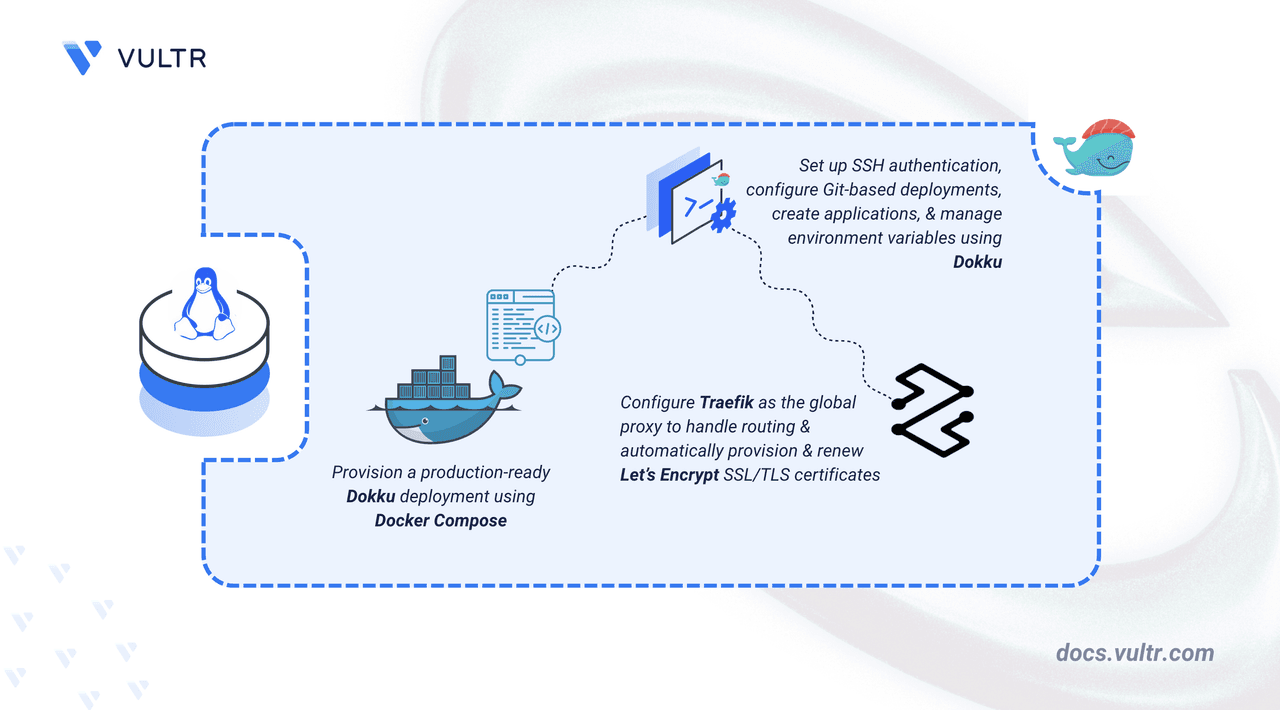
Dokku is an open-source Platform-as-a-Service that transforms a bare Linux server into a Heroku-like deployment platform. It uses Docker under the hood, supports multiple languages via buildpacks, and enables Git-based deployments with zero-downtime. This article details how to deploy Dokku 0.37.6 on Ubuntu 24.04 using Docker Compose, configure SSH authentication, manage environment variables, and set up automatic HTTPS with Let's Encrypt through Traefik.
Prerequisites
- A Linux server with at least 2 CPU cores and 4 GB of RAM.
- Ubuntu 24.04 with a non-root user that has sudo privileges.
- Docker and Docker Compose installed.
- A DNS A record pointing to your server's IP (e.g.,
dokku.example.com).
Directory Structure and Environment Variables
Create the project directory and a .env file to store configuration:
mkdir -p ~/dokku/data
cd ~/dokku
nano .env
Add the following contents:
DOKKU_HOSTNAME=dokku.example.com
DOKKU_VERSION=0.37.6
Replace dokku.example.com with your actual domain. The .env file feeds variables into Docker Compose.
Docker Compose Configuration
Add your user to the Docker group to run Docker commands without sudo:
sudo usermod -aG docker $USER
newgrp docker
Create docker-compose.yml:
services:
  dokku:
    image: dokku/dokku:${DOKKU_VERSION}
    container_name: dokku
    network_mode: bridge
    ports:
      - "3022:22"
    volumes:
      - "./data:/mnt/dokku"
      - "/var/run/docker.sock:/var/run/docker.sock"
    environment:
      DOKKU_HOSTNAME: ${DOKKU_HOSTNAME}
      DOKKU_HOST_ROOT: /var/lib/dokku/home/dokku
      DOKKU_LIB_HOST_ROOT: /var/lib/dokku/var/lib/dokku
    restart: unless-stopped
Key points:
- Port 3022 on the host maps to port 22 in the container for SSH-based Git deployments.
./data:/mnt/dokkupersists Dokku state (apps, config, plugins, certificates).- Mounting
/var/run/docker.sockallows Dokku to manage application containers directly on the host Docker daemon.
Start the service:
docker compose up -d
docker compose ps
Verify the container is running and port mappings are correct.
SSH Key Setup for Git Deployments
Dokku uses SSH for all management tasks. Generate an Ed25519 key on your local machine:
ssh-keygen -t ed25519 -f ~/.ssh/id_ed25519 -C "dokku"
cat ~/.ssh/id_ed25519.pub
On the server, add the public key to Dokku:
echo "YOUR_SSH_KEY" | docker compose exec -T dokku dokku ssh-keys:add admin
Verify the key was added:
docker compose exec -it dokku dokku ssh-keys:list
Configure Remote Access
Edit ~/.ssh/config on your local machine:
Host dokku-server
    HostName YOUR_SERVER_IP
    User dokku
    Port 3022
    IdentityFile ~/.ssh/id_ed25519
Test the connection:
ssh dokku-server help
ssh dokku-server version
You should see the Dokku version (0.37.6).
Deploy a Sample Application
Create a Dokku app:
ssh dokku-server apps:create ruby-getting-started
Clone the sample app and add the Dokku remote:
git clone https://github.com/heroku/ruby-getting-started
cd ruby-getting-started
git remote add dokku dokku-server:ruby-getting-started
git push dokku main
Dokku detects the Ruby app via buildpacks, builds it, and deploys it. The output shows the URL where the app is accessible.
Manage Environment Variables
Set single or multiple variables:
ssh dokku-server config:set ruby-getting-started SECRET_KEY=your-secret-value
ssh dokku-server config:set ruby-getting-started DB_HOST=localhost DB_USER=admin DB_PASS=secret
View all variables:
ssh dokku-server config:show ruby-getting-started
Remove a variable:
ssh dokku-server config:unset ruby-getting-started SECRET_KEY
Dokku restarts the app automatically on config changes.
Enable Automatic HTTPS with Traefik
Dokku includes Traefik integration for automatic Let's Encrypt certificates. Stop the default nginx proxy and set Traefik as global:
ssh dokku-server nginx:stop
ssh dokku-server proxy:set --global traefik
ssh dokku-server traefik:set --global letsencrypt-email username@example.com
Set the domain for your app:
ssh dokku-server domains:set ruby-getting-started dokku.example.com
Start Traefik and rebuild the app to inject Traefik labels:
ssh dokku-server traefik:start
ssh dokku-server ps:rebuild ruby-getting-started
Navigate to https://dokku.example.com – the browser shows a padlock, confirming a valid Let's Encrypt certificate.
Conclusion
You now have a fully functional Dokku 0.37.6 PaaS running on Ubuntu 24.04. It handles Git-based deployments, SSH authentication, environment variable management, and automatic SSL/TLS via Traefik. Next steps: deploy a real application, set up a database plugin, or explore Dokku's plugin system. For more details, check the official Dokku documentation.